What Is A 360 Degree Panoramic Photo And How To Make One

11/26/06  Print This Post Print This Post    10 Comments   Popular   Written by Doug Dosdall
  • Stumble It

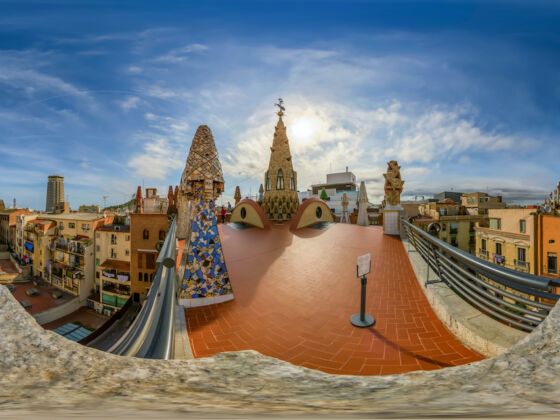
An example of a 360 panorama, by Yoshiyuki Kaneko

A couple of days ago I created a 360 scrollable & zoomable panorama of the property I bought in Puerto Viejo, Costa Rica. The actual process of creating this panorama was surprisingly easy. The harder part was researching the tools I needed to do it.

So to save you some time, I’ll let you know how I did it.

Step 1 – Shoot Your Photos

First, take a series of photos with a 360º view of your subject. A tripod is the best way to do this. Just rotate the camera around. You need to make sure there is some overlap between the images so that they can be stitched together with no missing pieces.

Afterwards, download the photos from your camera to one folder on your computer.


Step 2 – Pick Your 360 Photo Software

You’ll need a program to stitch the images together into one wide panorama shot. There are, of course, many tools out there for creating a 360 panorama (you may have even gotten some with your camera software).

Programs like Photoshop will let stitch photos together, but the process is time-consuming and imperfect. Instead I looked for a program that was both easy to use and free to download, which is why I settled on AutoStitch.

The panorama I’ll show you how to create is a cylindrical shot (what you’d see if you pasted a series of pictures inside a tube). You can also create a spherical panorama so you can scroll in any direction. I haven’t tried one of these yet.

Step 3 – Stitch The Photos Together

Autostitch does everything for you. I used almost all the default options for my Puerto Viejo property panorama.

Click Edit, Options to see the options. I changed the scale to 50% to create a larger higher quality result than the 10% defaulted. That is with my 3 megapixel camera. You may need a different setting depending on the result you want and how big an image your camera creates.

To stitch the images all you need to do is select File –> Open and multiselect the images you want to stitch. Everything else happens automatically!

The program does some processing to find the edges between the pictures and produces a file named “pano.jpg” in the same directory as your images (make sure to rename this file when you’re done as it will overwrite it if you try to make a second panorama in the same folder later).

Step 4 – Transform It Into A Scrollable Video

Lastly, you’ll need a program to turn that single wide image into a scrollable and zoomable video. Here I use Pano2QVTR – you can download a free and pro version.

When it opens click start a new project. Again, there are many settings you can change here along with features such as “adding hotspots” and sound to your image. But again used the defaults for my panorama. The only thing I changed was to make a larger 800Ã-600 Quicktime image rather than the default 400Ã-300. This will increase the processing time, but it’s worth it to have a larger, more interesting panorama.

That’s it, you’re done!

The only problem I ran into was with another picture set. Autostitch seemed to stop halfway around the circle and gave me more like 180 º instead of 360º. It’s likely I screwed up somewhere taking the photos and it couldn’t find the link between one photo and the next. Try to avoid this problem by taking a few variations on your photos so you have a variety to choose from if one of the views isn’t working.

Happy panorama-ing! Check out the World Wide Panorama Map for some other mind-blowing examples of 360 degree panoramas.

Doug Dosdall is an avid wanderer, travel writer, and creator of TravelBlogs.com. Visit his personal blog here.


  • Stumble It

About the Author

Doug Dosdall

Doug Dosdall is a travel writer and travel website designer based in Vancouver, BC but with an addiction to warm winters in Latin America. His web design company is DohMedia and his latest projects are www.PuertoVallartaSatellite.com and www.PuertoViejoSatellite.com.

More By This Author

10 Comments... join the discussion!

  • virtualworld360 replied on December 10, 2006

    Hi, I came across your interesting post and thought you might want to check out our 360 widgets. We are using a mixture of equirectangular projections and stills with audio and voice commentary, currently we have 4 different widgets to choose from which have been designed to fit in a blog sidebar or post, have a look in our gallery and let me know what you think. Regards Fraser Cairns

    (Report comment)

    ↵ Reply
  • nick hoang replied on April 23, 2007

    i just want to say thank you, such a useful post

    (Report comment)

    ↵ Reply
  • ryan libre replied on October 11, 2007

    thanks, very helpful. one thing is, on your panoVR its obvious the photos were different brightnesses and taken at different exposures. try setting you camera to Manual if it has that setting. its the only way to insure your photos are exposed the same. thanks again!

    (Report comment)

    ↵ Reply
  • kapalic replied on November 12, 2007

    Great and usefull post. I was just searching for a free software to create 360 photos, and found link here.

    Thank you very much.

    (Report comment)

    ↵ Reply
  • Prakash N replied on May 21, 2008

    Great and such a wonderful post. I was looking for a similar kind of software for my clients website. Now i Gotta it from your post.
    Thanks once again.

    (Report comment)

    ↵ Reply
  • maria replied on June 10, 2009

    do you know about a free software for mac users??

    (Report comment)

    ↵ Reply
  • niko replied on August 5, 2009

    thank you for the post,

    i want to ask, is there possible to put some certain node/button in the middle of the picture/movie to be used as a link to another movie/file?

    thanks again

    (Report comment)

    ↵ Reply
  • Sergio replied on August 15, 2009

    Your post has been very helpful. I´ve wanted to do panoramics of outdoors to share with my friends and did not know how. Very clear explanation.

    Thanks

    (Report comment)

    ↵ Reply
  • gerardo sanchez replied on January 11, 2010

    Very helpful, thanks a lot.
    greets from chili

    (Report comment)

    ↵ Reply
  • Guy Lafond replied on March 14, 2010

    I wasn’t expecting such an friendly free software for 360 photos! I made a very crude test without a tripod in my living room and the result was amazing. Thanks for taking the time to do this, very much appreciated! We are soon taking a trip to New York City, this will be a great place for panoramic 360 photos! Guy

    (Report comment)

    ↵ Reply

Leave a Comment

Jump To Category:


Popular Stories on Matador

How To Bake Your Own Amazingly Easy, Incredible Bread

Join the artisan bread revolution today!... 

How to Discern Fallacious Arguments

Writers working in nonfiction, including travel

10 Volunteer Opportunities For Free Travel

From assisting with disaster relief to helping on the A... 

Tim and Tom's Excellent Adventure Part 1: Cashews

"Disposing of my boxers in the bathroom garbage can, I ... 

WTF Is It About Those Cats, LOL!

What is it about a cat in a fruit helmet that just make... 

Swinging Mallets and Breaking Beers: An Intro to Extreme Croquet

The only sport where your victory may be determined by ... 

Burakku: Black Culture In Japan

“Kokujin kakkoii!” is what I was often told wheneve... 

10 Brands That Don’t Deserve To Declare Themselves “Green”

... 

The Best Condiments in the World Right Now

Tzakiki combines puréed cucumber and strained yoghurt ... 

Where to Go for Carnival if You're in Europe

These 4 European cities prove that Rio hasn't cornered ... 


Focus


Editor Blogs

Friends